A UTM (Urchin Tracking Module) is a tracking parameter added to the end of a URL that tells your analytics platform where a visitor came from and how they arrived at your site. When a user clicks a link containing UTM parameters, the information is passed to your analytics tool, typically GA4, and recorded against that session. UTMs allow you to track the performance of specific campaigns, channels, and content pieces without relying solely on platform-reported data.
What are the UTM parameters?
There are five UTM parameters, each tracking a different dimension of the traffic source:
| Parameter | What it tracks | Example value |
|---|---|---|
| utm_source | The platform or origin of the traffic | google, facebook, newsletter |
| utm_medium | The type of marketing channel | cpc, email, social, organic |
| utm_campaign | The specific campaign name | brand_awareness, summer_sale |
| utm_term | The keyword that triggered the ad (paid search only) | digital_marketing_bangkok |
| utm_content | The specific ad or link, used for A/B testing | banner_v1, text_link_footer |
How do UTM parameters work in practice?
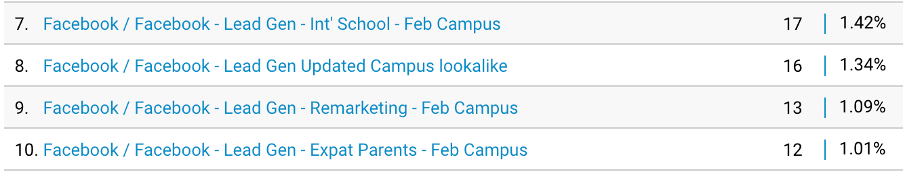
When a user clicks a UTM-tagged URL, those parameters are read by GA4 and stored with the session data. You can view this in GA4 under Reports > Acquisition > Traffic Acquisition, filtered by session source or medium. At Phoenix Media, we tag every campaign link before launch so that results in GA4 map directly to specific campaigns rather than appearing as unattributed direct traffic. Without UTM tagging, traffic from email campaigns, social posts, and paid ads can be misclassified or grouped together, making it difficult to evaluate what each channel actually delivered.
What are the naming conventions for UTM parameters?
Consistent naming is essential for UTM data to be useful. Poorly formatted tags create fragmented data that is difficult to analyse across campaigns. The key rules are:
- Always use lowercase: utm_source=Google and utm_source=google create separate entries in GA4
- Use hyphens or underscores instead of spaces, as spaces in URLs cause tracking errors
- Agree on standard terms across the team before any campaign goes live. Decide whether to use 'cpc' or 'paid-search', for example, and apply it consistently
- Do not add UTM parameters to internal links within your own site, as this overwrites the original session source
How do you build a UTM link?
The simplest way to build a UTM-tagged URL is Google's Campaign URL Builder, available at ga-dev-tools.google.com/campaign-url-builder. Enter the destination URL, fill in the relevant parameters, and the tool generates a tagged link ready to use. For larger campaigns with many links, building a UTM tagging template in a shared spreadsheet, with naming conventions agreed in advance, reduces errors and ensures data is consistent across the team. A consistent tagging approach at the start of a campaign saves significant time when it comes to reporting.