Google Analytics 4 (GA4) is Google's current web and app analytics platform. It replaced Universal Analytics in July 2023 and is now the standard tool for tracking website traffic, user behaviour, and conversions. GA4 uses an event-based data model, which gives it more flexibility than its predecessor and allows it to track behaviour across websites and apps within a single property.
How is GA4 different from Universal Analytics?
Universal Analytics tracked data using sessions and page views as the primary unit of measurement. GA4 measures everything as events, including page views, scrolls, clicks, video plays, and form submissions. This makes it easier to track how users interact with a website beyond simple page visits. GA4 also natively combines web and app data into one property, uses machine learning to fill gaps in data caused by cookie restrictions, and has a redesigned reporting interface that requires some adjustment for users familiar with Universal Analytics.
What can you track with GA4?
GA4 automatically tracks a range of events without additional configuration, including page views, session starts, first visits, scroll depth, outbound link clicks, site search queries, and video engagement. Additional events can be configured to track specific actions relevant to your business, such as form submissions, button clicks, or purchases. These custom events can then be marked as conversions so you can measure how effectively your website and campaigns drive the outcomes that matter.
What are the most useful reports in GA4?
The most commonly used reports for day-to-day analysis include:
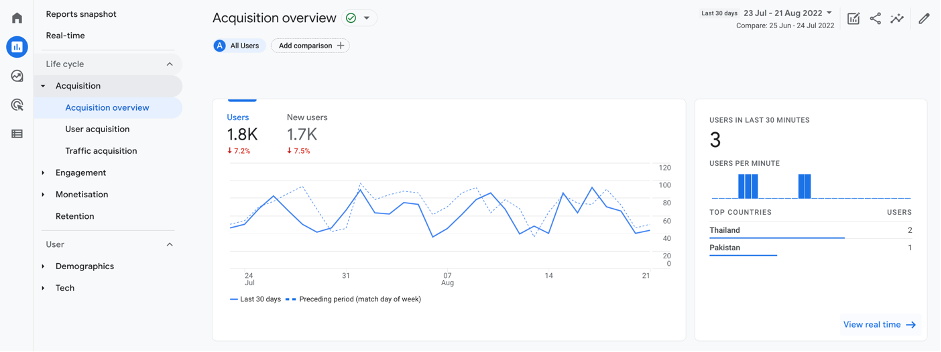
- Reports > Acquisition > Traffic acquisition: shows where your visitors are coming from (organic search, paid, social, direct, referral)
- Reports > Engagement > Pages and screens: shows which pages receive the most traffic and engagement
- Reports > Monetisation > Conversions: tracks how many times key events (such as contact form submissions) have occurred
- Explore: a section for building custom reports and funnels not available in the standard reporting views
How do you set up GA4 on your website?
GA4 is installed by adding a tracking code to every page of your website. The easiest method is through Google Tag Manager: create a GA4 Configuration tag in Tag Manager, enter your Measurement ID from your GA4 property, and set it to fire on all pages. Alternatively, the tracking code can be added directly to the website's header code.
Once installed, data starts flowing within 24 to 48 hours. Conversion events should then be configured to match the actions your business wants to measure.