Google Tag Manager (GTM) is a tag management system that lets you add, update, and remove tracking and marketing code on your website or app without editing the source code directly. Once a single GTM container snippet is installed, all subsequent tag changes are made through the GTM interface. This removes the need to involve a developer every time a tracking or analytics update is required.
How does Google Tag Manager work?
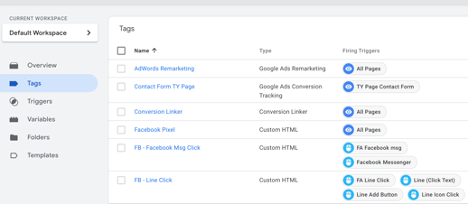
GTM works through three core components: tags, triggers, and variables. A tag is the piece of code you want to fire, such as a GA4 tracking script, a Meta Pixel, or a Google Ads conversion snippet. A trigger defines the condition under which that tag fires, for example when a user visits a specific page, submits a form, or clicks a button.
Variables store dynamic values that tags and triggers need, such as the current page URL or the text content of a clicked element. When a visitor lands on your site, GTM loads the container, checks which triggers match the current conditions, and fires the relevant tags accordingly.
What can you track with Google Tag Manager?
GTM is used to deploy a wide range of tracking and marketing tags without requiring individual code installations. Common uses include:
- GA4 event tracking for page views, scroll depth, video plays, and custom events
- Google Ads and Meta Pixel conversion tracking
- Remarketing tags for display, search, and social platforms
- Form submission and lead generation event tracking
- LINE Tag deployment for campaigns targeting Thai audiences
Does Google Tag Manager replace GA4 or other tracking tools?
GTM and GA4 are separate tools that work together. GA4 is the analytics platform that collects and reports on your data. GTM is the delivery mechanism that fires the GA4 tracking code on your site, alongside any other tags you have configured.
You can install GA4 directly on a website without GTM, but using GTM makes it easier to manage all your tracking tags from one place, add new tags without developer involvement, and test changes before publishing. Most setups benefit from using both: GTM for tag management and GA4 for data collection and reporting.
Who manages Google Tag Manager?
GTM is designed to be managed by marketing and analytics teams without ongoing developer involvement, though initial setup typically requires a developer to install the container snippet on the site. At Phoenix Media, we manage GTM containers for clients across Thailand, configuring tags for GA4 event tracking, Google Ads conversions, Meta Pixel, and LINE Tag. Keeping a container organised with consistent naming conventions and version control is important for auditing what is firing on a site and why. GTM's built-in Preview and Debug mode lets you test tags before publishing, which reduces the risk of deploying broken or duplicate tracking.