A Google Business Profile (GBP) is a free listing that controls how your business appears in Google Search and Google Maps when someone searches for your business name or relevant local services. A well-optimised profile improves visibility in local search results, provides potential customers with the information they need to contact or visit you, and builds credibility through reviews and photos.
How do you complete your Google Business Profile?
- Claim and verify your listing at business.google.com. Verification is usually done by postcard, phone, or video, depending on your business type and location.
- Set your business name exactly as it appears on your signage and official materials. Do not add keywords or location names to the business name field, as this violates Google's guidelines and can lead to suspension.
- Select the most accurate primary category for your business. This is one of the most important ranking signals in local search. Add secondary categories where relevant.
- Add your address, service area, phone number, and website URL. Ensure these match exactly what appears on your website and other online directories.
- Write a business description of up to 750 characters. Focus on what you do and who you serve. Avoid promotional language, links, or repeated keywords.
- Upload high-quality photos: a logo, a cover photo, and interior and exterior images where applicable. Profiles with photos receive significantly more clicks than those without.
What ongoing actions improve your local ranking?
Completing the profile is the foundation. The following ongoing activities signal to Google that the profile is active and well-managed:
- Respond to all reviews, both positive and negative. Responses show engagement and influence how prospective customers perceive the business.
- Post regular updates using the Posts feature: news, offers, events, or product highlights. Posts appear in the profile panel in search results.
- Keep business hours up to date, including special hours for public holidays.
- Answer questions in the Q&A section, both user-submitted questions and pre-emptive questions you add yourself about commonly asked topics.
- Add new photos regularly. Google favours profiles with fresh, recent imagery over those with a static photo library.
How do you monitor Google Business Profile performance?
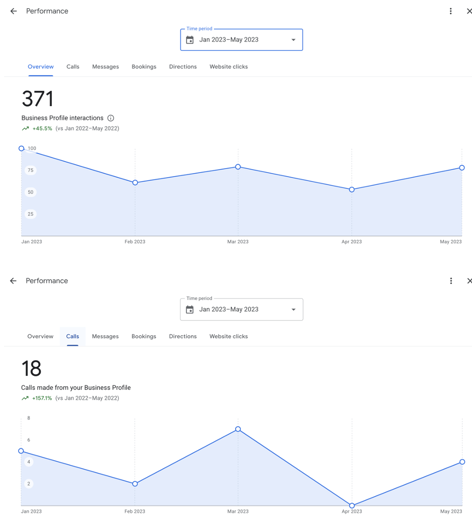
Google Business Profile provides a built-in performance dashboard showing how many people searched for your business, how many viewed your profile via Maps or Search, and how many took actions such as requesting directions, visiting your website, or calling. For businesses in Thailand, the Maps metric is often the strongest indicator of local discovery. Tracking these figures monthly reveals whether profile activity and completeness changes are having an effect on visibility. For businesses running Google Ads, the GBP can be linked to the account to enable location assets, which add the business address and call button to ads appearing in local searches.