As a digital marketing company in Bangkok, we understand that user experience (UX) is the key metric when it comes to SEO and your rankings. SERPs consistently show that content created with a human-centric approach ranks higher than content designed merely to manipulate Google’s complex algorithms. Using UX to improve your ranking means considering the whole process long before you even start thinking about your website.
What is User Experience?
When a user visits your website, they instantly form an impression of your brand, services, and products. The objective is to make this first an excellent impression to increase the chances of greater engagement either now or in the future. It will involve product development, the design of your website, including page speed and readability, how you market yourself and your levels of customer support.
In this chapter, we will focus on the “online” aspect of the user’s experience. As customers become increasingly demanding and with an abundance of options available, the UX should exceed customer requirements and surpass their expectations. To achieve this, you need to put yourself in the customer’s shoes, see things from their perspective and to coin a phrase, “think outside the box”. You should eclipse the customer’s needs and do this without causing them any inconvenience – a challenge, but one you need to meet.
UX Vs UI
While UX focuses on the overall experience, User interface (UI) refers to the ease of using specific elements on a website. For example, your products may be easy to locate, and navigation between pages is straightforward with useful links. However, when your customer comes to pay, they encounter problems.
It is possible that they don’t know if they have ordered or not. This would mean that their UX is poor even though, for the most part, the UI was positive.

UX in 2024
UX is something that is never complete and is an ongoing process that continually evolves. Incorporating UX into your SEO strategy means considering several factors, including technical elements and content quality. From a psychological perspective, you must understand the complexity of user interactions and the impact they can have on everyone. Key factors to consider for 2024 include:
- The structure of your website and how easy it is to navigate
- Page loading speeds and the responsiveness of the website
- Effective CTAs (calls to action) to boost conversions and improve UX
- Streamlined onboarding processes
- Optimised content with proper grammar, readability, and tone
- SEO optimisation (meta descriptions, title tags, etc.)
- Real-time customer support integration
Challenges in Aligning UX with SEO
Not all aspects of UX directly relate to SEO, but the two are interdependent. In this section, we focus on the points connected to SEO and illustrate the conflict between UX and SEO.
Website Structure and Navigation
For enhanced UX, ideally, all the information would be available on a single page, and for websites with less content, this makes sense. However, from an SEO point of view, sites which contain only a single page only receive around half of the organic traffic. The objective of SEO is for most of your visitors to arrive on your site via organic searches or directly accessing your site. However, you will also encourage other visitors via social media, blogs or Pay per Click (PPC) campaigns.
To accommodate varied user intent and search queries, a series of landing pages is more practical than a single page. The vast majority of users use Google to find something that they want, whether it is answers or products. Your objective is for your website to provide all those answers. In reality, it is impossible on a single page due to the number of possible search queries and the intent behind them.
It isn’t possible to fit hundreds, possibly even thousands of answers to searches on one page. As mentioned above, having a series of different landing pages is more practical, but this presents the challenge of users wanting other pieces of information which may be on separate pages. Internal links are fantastic, but there is a limit to how many you can include before it harms UX.
Page Speed and Responsiveness
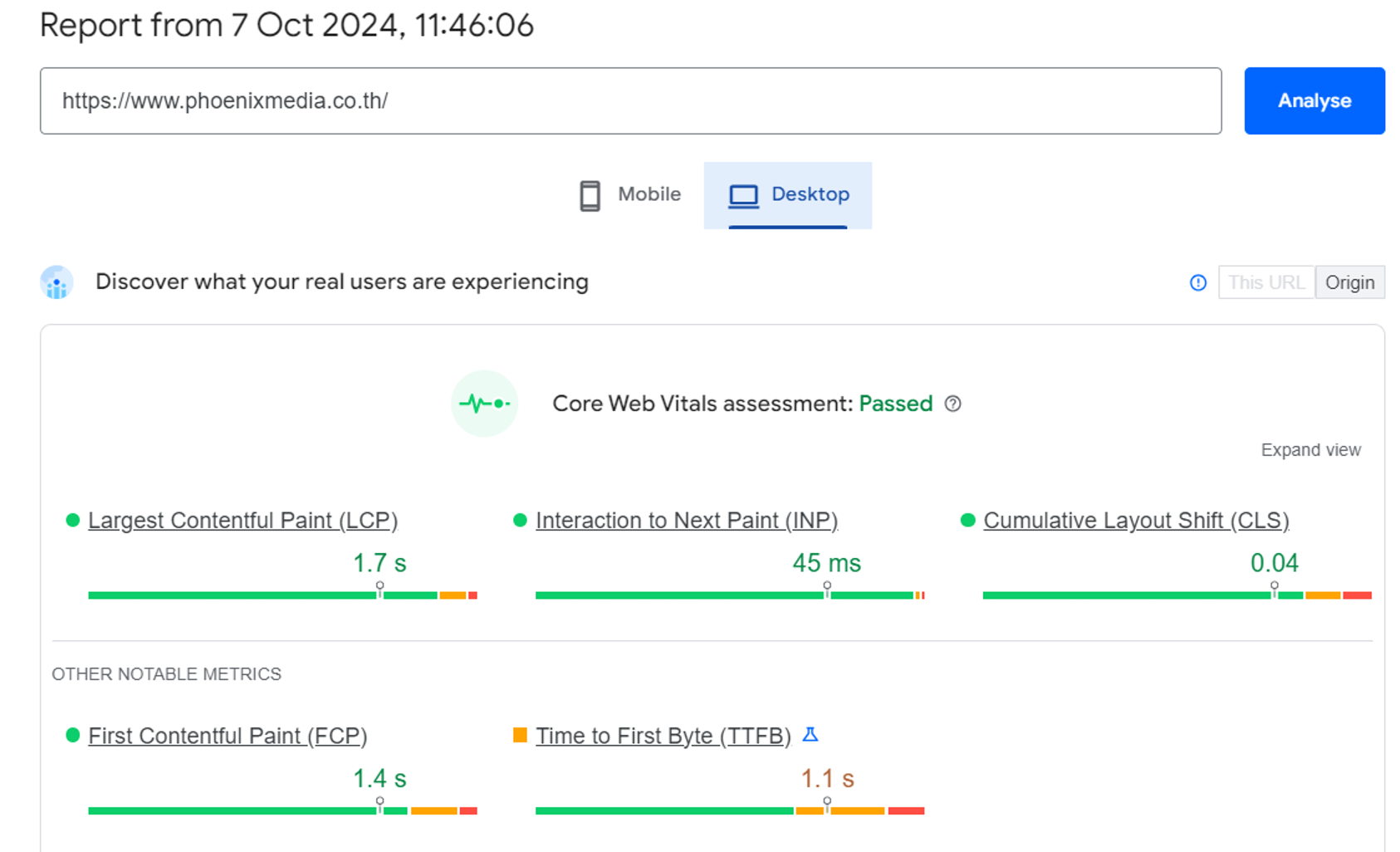
As we mentioned in chapter three, Google continues to prioritise page speed as a ranking factor in 2024, and it’s also essential for a good UX. Faster loading times lead to lower bounce rates and higher engagement, so making your site as fast and responsive as possible is critical for both SEO and UX.
Optimising Content
Content optimisation remains at the heart of SEO. You must anticipate the language your audience uses, including long-tail keywords, and align your content accordingly.
If your website has a product or service that someone is searching for, or it can provide answers to the questions that the user wants answering, you should make your content as accessible as possible. This is where the search intent that we covered in chapter four comes into play – don’t optimise the wrong keywords!
Voice Search Optimisation
As the use of voice-activated devices steadily grows, optimising for voice search queries is essential. Focus on natural language and question-based keywords.

Use Conversational Language: Use natural language to match the conversational nature of voice search queries.
Target Long-tail Keywords: Use complete sentences and question-based keywords that people would likely use in conversation.
Add Frequently Asked Questions (FAQs): Create an FAQ section at the bottom of website pages.
Employ Schema Markup: Use structured data to help search engines understand the context of your content.
Capture Featured Snippets: Format sections of your website with questions and answers, create a list of items that relate to a search query, or create a table with comparison data.
Meta Descriptions and Title Tags
Meta descriptions and title tags still play an important role in SEO in 2024. As we have stressed throughout this guide, the higher your website appears in the SERPs, the greater the probability that it will get clicked on. However, if you get the meta descriptions and title tags wrong, you may divert the user’s attention elsewhere as they don’t feel your site is relevant. When you are creating title tags and meta descriptions, there are three things that you need to take into account.
- SEO – Although we keep saying users come first, using the right keywords, ones that crawlers understand, will help them to know what your website is all about.
- UX – You must provide users with clear and concise information about what your website contains and motivate them to click on your site.
- Marketing – the copy must be of a high standard, capture the imagination along with being a “must-read” article or blog. Don’t forget to include clear CTAs as this will lead to higher click-through rates.

Mobile-first Indexing
With over 60% of web traffic coming from mobile devices, Google now prioritises mobile-first indexing. Ensuring a seamless mobile UX is crucial for both SEO and user satisfaction.
Mobile-first Design: Websites should be designed primarily for mobile screens, ensuring a seamless experience on smaller devices.
Responsive Design: Websites should adapt to different screen sizes automatically, providing a consistent user experience across all devices.
Touch Interactions: Buttons and interactive elements should be large enough for easy touch interaction on mobile screens.
Is It Possible to Measure SEO and UX?
Fortunately, Google has provided us with several tools in their Google Analytics (GA) which includes reports and internal data. However, interpreting the data is key. Once you have understood it, you can use it to make your website even better from both a UX and an SEO perspective. Here are some of the main features to focus on:
Engagement and Behaviour Metrics:
Metrics like “Bounce rate”, “Pages per session”, and “Avg. session duration” offer insights regarding user interaction, albeit relatively simplistic. Within GA and the numerous reports that are generated, you will see these metrics appear time and again, even showing different sources of traffic.
The “Behaviour” category provides far more information regarding user activity but is quite complicated. “Behaviour flow” includes information regarding the visitors’ interactions with your site with the more advanced options detailing traffic sources, pages that the browser landed on, campaigns that they clicked and so forth. Knowing how many users continued through your website or “dropped-off” when they visited certain areas of your website will give you an indication of whether the content is effective.
Conversion Funnels
Tracking conversions is vital for most websites. How many visitors continued through to the checkout page? If so, did the majority complete their orders and if not, why not?
Does your checkout process have several steps, again if so, where did they back out of completing the purchase? In 2024, tools like GA’s Enhanced eCommerce features allow you to analyse exactly where users drop out during the checkout process, giving you actionable insights into improving UX. Also, make sure that you set goal tracking in the admin menu so that you get as much information as possible.
It will give you a good idea if the checkout process provides a good UX.
Heatmaps and Recordings
Infographics and visualisations are frequently used to help people understand large amounts of data, and this is precisely what heatmaps are. Heatmaps show website visitor behaviour, and they can range in their levels of sophistication and cost. Hotjar and Ptengine offer free plans which provide detailed analytical data while large organisations may prefer Hotjar or Crazy Egg’s paid-for packages.
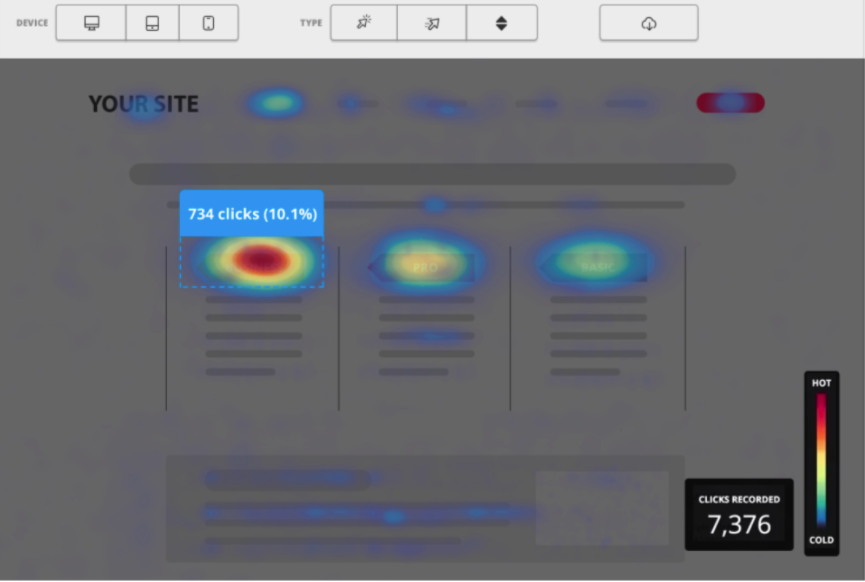
Heatmaps are useful when it comes to accessing UX as well as SEO because they can see which areas of your website site are getting the greatest interaction. You can even see how they scroll, complete forms and where they click. Knowing this type of behaviour can help with the presentation and layout of the website.
Google Core Web Vitals:
As of 2024, Core Web Vitals, specifically metrics like Largest Contentful Paint (LCP), First Input Delay (FID), and Cumulative Layout Shift (CLS), continue to impact rankings. Ensure these metrics are optimised for the best possible user experience.
Leveraging Internal Data:
While comprehensive heatmap packages can prove to be costly, collating your own internal data is free. Many companies overlook the wealth of data they already possess. Gathering customer feedback, analysing patterns in questions or complaints, and tracking behaviour across your website and social media channels can provide valuable insights. Here are some things to consider:
- Include feedback forms
- Monitoring customers’ questions – is there a pattern?
- Accessing comments and reactions on your website and social media
- What common comments, questions or complaints do you receive via email?
- Overall marketing analysis
- Do your web developers produce any reports for you?
Testing and Improving
It is surprising how often website developers and those doing SEO overlook testing new things that they have added to the site. Before rolling out new features or content, use beta testers or conduct A/B tests to gather feedback on usability. If you don’t wish to go down this route, conduct tests on the usability yourself, with friends and colleagues or trusted clients. The most important thing is that the feedback is honest.
As we discussed in chapter three, part of your testing should include checking page loading speeds, mobile optimisation and the other elements of on-page SEO. Testing should never be rushed and delaying launching your website would be preferable to launching one with poor UX.
- What is user experience?
- UX Vs UI
- UX in the modern world
- The challenges you will experience with SEO and UX
- The structure of your website and navigation
- Page Speed and Responsiveness
- Ensuring that the content is optimised
- Meta descriptions and title tags
- Is it possible to measure SEO and UX?
- Engagement and behaviour metrics
- Conversion funnels
- Heatmaps and recordings
- Use your own internal data
- Finally – testing