Both Google Ads and Meta Ads use automatic billing systems that charge your payment method after spend is accrued, rather than requiring you to top up in advance. Understanding how each platform bills helps avoid unexpected charges, failed payments, and campaign disruptions.
How does Google Ads billing work?
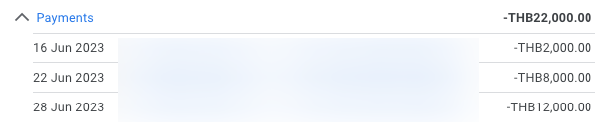
Google Ads uses a post-pay billing model by default. As your campaigns run and accrue costs, Google charges your payment method either when you reach a billing threshold or at the end of the billing period (usually the end of the calendar month), whichever comes first. The billing threshold starts low for new accounts and increases over time as payments are made successfully.
For example, a new account may be charged after every 350 THB of spend; an established account may only be charged after 10,000 THB or more. Monthly invoicing is available for larger accounts that meet Google's spend requirements. In Thailand, accepted payment methods include major credit and debit cards; bank transfer invoicing is available on qualifying accounts.
How does Meta Ads billing work?
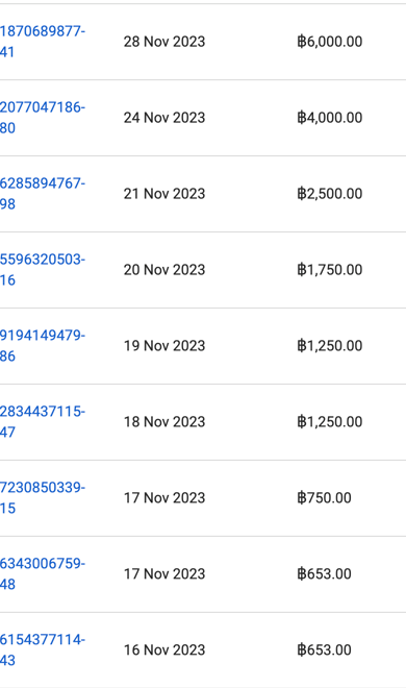
Meta also uses a post-pay billing threshold model. As your ad spend accumulates, you are charged when you reach your billing threshold or at the end of the month. New accounts start with a low threshold that increases with account age and payment history.
Meta also offers a prepay option for some accounts, where you add funds to your ad account in advance and campaigns draw from that balance. In Thailand, accepted payment methods include Visa, Mastercard, and PayPal. Local payment methods availability can vary and is worth checking within your specific account's billing settings.
What happens if a payment fails?
On both platforms, a failed payment causes campaigns to pause until the outstanding balance is settled. Google and Meta will attempt to retry the charge automatically and will notify you by email. To resolve a failed payment:
- Check that the card on file has not expired and that sufficient funds are available
- Update the payment method in billing settings if required
- Make a manual payment to clear the outstanding balance, which will restart campaign delivery
- On Google Ads, navigate to Billing and then Make a Payment; on Meta, go to Billing and then Pay Now
Can you set a monthly budget cap?
Google Ads allows you to set a monthly spending limit at the account level in Billing settings, which acts as a hard cap on total monthly spend across all campaigns. This is separate from individual campaign daily budgets and is a useful safety net for accounts managed by multiple users. Meta does not have an equivalent account-level monthly spend cap; budget control on Meta is managed through campaign and ad set daily or lifetime budgets. For clients with strict monthly budget requirements, we set daily budgets at the ad set level and monitor spend throughout the month to ensure total outlay stays within the agreed limit.