Facebook Lead Forms, also called Instant Forms, are a Meta Ads feature that lets users submit contact details directly within Facebook or Instagram without leaving the platform. Because the form pre-fills with the user's profile information, the submission process is quick, which typically results in higher conversion rates than directing users to an external landing page.
What are Facebook Lead Forms?
Instant Forms capture information such as name, email, phone number, and any custom questions defined by the advertiser. They are created in Meta Ads Manager as part of a Lead Generation campaign. Submissions are stored in Meta Business Suite and can be downloaded manually or connected to a CRM via integration. Because users stay within the platform, page load time and mobile experience are not barriers, which is particularly relevant in Thailand, where mobile is the primary device for Facebook and Instagram.
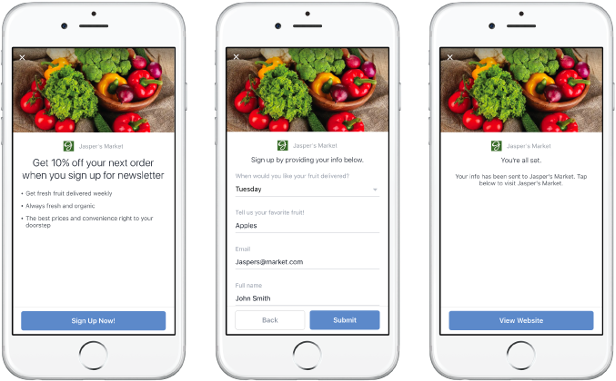
How do you set up a Facebook Lead Form?
- Open Meta Ads Manager and create a new campaign with the Lead Generation objective.
- At the ad set level, define your audience, budget, placements, and schedule.
- At the ad level, select your Facebook Page, then click Create Form under the Instant Form section.
- Choose your form type: More Volume (minimal friction) or Higher Intent (adds a review step before submission).
- Add your questions. Pre-filled fields such as email and phone number reduce drop-off; limit custom questions to what is genuinely needed.
- Add your privacy policy URL, a thank-you screen message, and a link to your website or next step.
- Save the form and publish the ad.
How do you download Facebook Lead Form submissions?
- Go to Meta Business Suite and select your Facebook Page.
- Click on Instant Forms under the Publishing Tools menu to open the Forms Library.
- Select the form you want to export leads from and click Download.
- Submissions are exported as a .csv file containing all captured fields and submission timestamps.
- For ongoing access, connect the lead form to your CRM using a tool such as Zapier or HubSpot's native Meta integration so leads are delivered automatically without manual downloads.

What should you do with leads once downloaded?
A downloaded lead list is only useful if it is acted on promptly. Response time is critical: the longer the delay between form submission and first contact, the lower the likelihood of conversion. We typically recommend a same-day follow-up process for clients in Thailand, either through an automated email response or a manual call within a few hours of submission. Connecting lead forms directly to a CRM removes the manual download step and reduces the risk of delays or missed leads, which is particularly important when campaigns are generating a high volume of daily submissions.