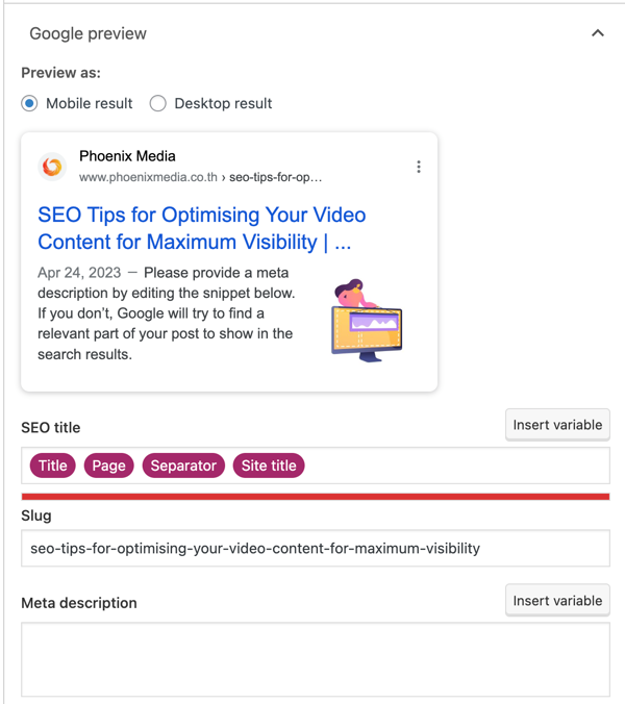
A meta tag is an HTML element in the header of a web page that provides information about the page to search engines and browsers. Meta tags are not visible to website visitors on the page itself, but they influence how the page appears in search results and how browsers display it. For SEO, the two most important meta tags are the title tag and the meta description.
What is a title tag?
The title tag defines the title of a web page and appears as the clickable blue headline in Google search results. It is also displayed on the browser tab when the page is open. Title tags should be unique for every page, accurately describe the content, include the primary keyword for that page, and be kept under approximately 60 characters to avoid being truncated in search results. Google may rewrite title tags it considers misleading or unhelpful, so accuracy is important.
What is a meta description?
The meta description is a short summary of the page content that often appears below the title in search results. It does not directly affect rankings, but a well-written meta description can improve click-through rate by giving users a clear reason to choose your result over others. Meta descriptions should be kept under approximately 155 characters. Like title tags, Google may substitute its own description from the page content if it considers the written meta description a poor match for the user's query.

What other meta tags matter?
Beyond the title and description, the following meta tags are relevant for SEO and content management:
- Robots meta tag: tells search engine crawlers whether to index a page and whether to follow its links. The noindex value prevents a page from appearing in search results.
- Canonical tag: specifies the preferred version of a URL when duplicate or near-duplicate content exists across multiple addresses. Prevents duplicate content from diluting SEO value.
- Open Graph tags: control how a page appears when shared on social media platforms, defining the title, description, and image used in the preview card.
- Viewport meta tag: instructs the browser how to scale and display the page on different screen sizes. Required for correct mobile rendering.
How do you edit meta tags?
On WordPress sites, meta tags are typically managed through an SEO plugin such as Yoast SEO or Rank Math, which provide dedicated fields for the title and description on each page and post without requiring any HTML editing. On other platforms, meta tags may be editable through the page settings or template configuration. For custom-built websites, meta tag changes are made directly in the HTML or through a CMS field that populates the HTML automatically.