Facebook Page notifications can become overwhelming, particularly for Pages with high engagement or active ad comments. You can manage notification frequency and types at two levels: through the Facebook mobile app for individual notification settings on your personal account, and through the Page Settings for email and push notification preferences related to the Page itself.
How do you turn off Page notifications on the Facebook mobile app?
- Open the Facebook app and tap the menu icon (three horizontal lines) at the bottom right on iOS, or top right on Android.
- Scroll down and tap Settings and Privacy, then tap Settings.
- Tap Notifications.
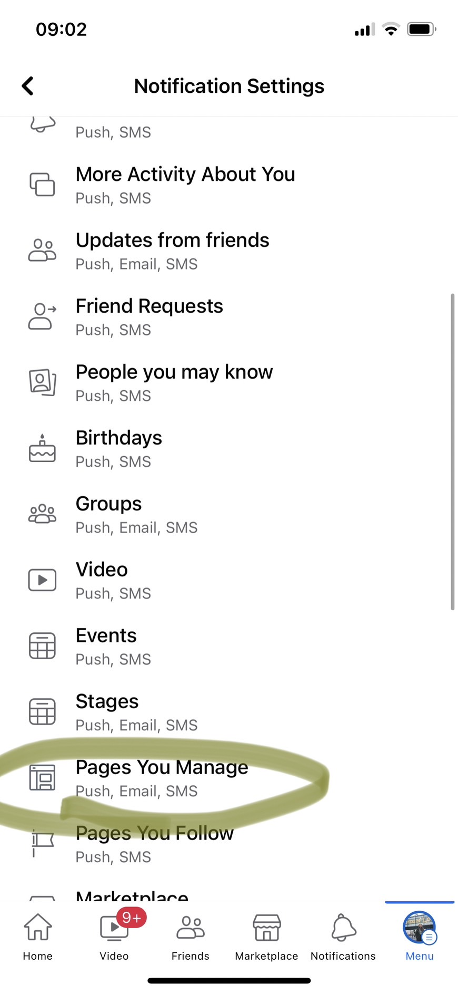
- Tap Pages you manage.
- Select the Page you want to adjust. You can toggle individual notification types on or off, such as new followers, post engagement, comments, and messages.
- To turn off all notifications for that Page, toggle off the main Page notifications switch at the top.
How do you adjust Page email notifications on desktop?
- Go to your Facebook Page on desktop and click Settings in the left-hand menu.
- Click Notifications.
- Under Email, you can select which activity triggers an email notification to you. Options include new followers, mentions, reviews, and messages.
- Uncheck any notification types you do not want to receive by email.
Can you mute notifications temporarily?
Facebook does not have a built-in snooze or temporary mute feature specifically for Page notifications. Your options are to turn notifications off entirely and turn them back on later, or to reduce the notification frequency by deselecting specific notification types rather than disabling all notifications. If you manage multiple Pages, adjusting settings per Page rather than globally gives you more control over which Pages generate push and email alerts.
What about notifications from Meta Business Suite?
If you manage your Page through Meta Business Suite rather than the standard Facebook interface, notification settings are found in Meta Business Suite under Settings, then Notifications. The options are similar but are managed separately from your personal Facebook notification settings. Changes made in Business Suite affect notifications within Business Suite; changes made in your personal Facebook settings affect notifications in the Facebook app and on facebook.com.