In Google Ads, keyword match types control how closely a search query must match your keyword before your ad becomes eligible to show. Choosing the right match type affects the volume of searches your ads reach, the relevance of those searches, and how efficiently your budget is spent.
What are the three keyword match types?
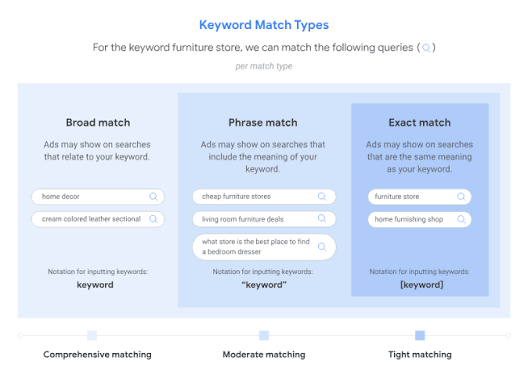
Each match type gives Google a different level of flexibility in matching your keyword to search queries:
| Match type | How it works | Example (keyword: digital marketing agency) |
|---|---|---|
| Exact Match | Ad shows only for queries that match the keyword's meaning, with no added intent | 'digital marketing agency Bangkok', 'digital marketing agencies' |
| Phrase Match | Ad shows for queries that include the meaning of the keyword, in any position | 'best digital marketing agency Thailand', 'hire digital marketing agency' |
| Broad Match | Ad shows for any query Google considers related, including synonyms and loosely connected topics | 'online marketing company', 'social media advertising services' |
When should you use each match type?
Exact match works best when you have a well-defined list of high-intent queries and want maximum control over which searches trigger your ads. Phrase match balances control with reach, making it useful for expanding coverage while staying within a relevant topic. Broad match reaches the widest audience and is best used alongside a robust negative keyword list and Smart Bidding, which uses your conversion data to filter out irrelevant traffic. At Phoenix Media, we typically start campaigns on phrase and exact match, then consider broad match once there is enough conversion data for the bidding algorithm to work effectively.
How do match types affect campaign performance?
Broad match tends to generate the highest impression volume but the lowest average relevance, which can lead to wasted spend if not monitored. Exact match delivers the highest relevance but limits reach. Most campaigns perform best with a combination: exact match for proven high-intent keywords, and phrase or broad match to discover new search terms. Reviewing the Search Terms report regularly and adding irrelevant queries as negative keywords is essential regardless of which match types you are using.
Match types work the same way in Microsoft Ads, so the same keyword strategy carries over if you extend campaigns through Bing advertising.